Wednesday, September 20, 2023

Encoding MP3 for CW Practice

Pangram Audio Files


In my CW-Ops Academy class, we are learning to copy simple phrases and words.

Among those phrases are lines of text called pangrams.

If the word pangram is unfamiliar, I'm sure this is not:

The quick brown fox jumps over the lazy dog.

That's a pangram.

In the class we were given a list of them and asked to practice sending them.  I wanted to practice copying them so I used some software, and wrote some more to support that in order to make these encodings.


In order to share the knowledge for how to do this yourself, here are the steps below.

Just a note -- it will require a bit of technical know-how to get setup.  I don't have it all packaged up so nicely that it is a simple "application" to download.  You'll have to make the environment yourself.

I did so on a Linux system.  I'm sure it's possible to do this on Cygwin or even in Windows, but the steps for that are more complicated.   The key is that these tools are scriptable.   They are not GUI applications.  We cannot use the GUI application to batch process strings of text into MP3s.

The first step is to get the main software that can encode text into WAV files:  WAV files are not the final product we want, but we need the WAV files first.

(If you don't have git, then I'd reconsider this process.  It needs some skill in getting the software installed correctly.  If you've never used git, then you're likely not to have used apt, which means unless you want to do some additional homework, the process may frustrate you.  But you are encouraged to carry on if you wish.)

The tool we need is  a python script that someone wrote to convert text into WAV files.  Many tools can probably do this, but this one is very simple and command-line oriented.  We do not want a GUI application.

That tool is located here:


So, in Linux  (or any shell where you have git), clone the repo.

$ git clone https://github.com/cduck/morse.git

Don't use the software there yet.  We need another tool.  We need to get ffmpeg

$ sudo apt install ffmpeg

ffmpeg is a package that you can install on your system.

Once those tools are installed, here is how you can test them.

$ cd morse

That takes you into the directory of the repository you cloned above.

Then type this:

$ echo "hello world" | python3 play.py -f 650 --fs 10 --wpm 20 -o input.wav

What that does is offer the string "hello world" to the python script play.py.

-f 650
--fs 10
--wpm 20
-o input.wav

Here is what they mean:

-f N   is to set the tone frequency (Hz) of the CW.   Choose N that correct for your use case.

--fs N  is to set the Farnsworth speed of the words.  The lower the value N, the more space there is between the letters.

--wpm N is to set the words per minute speed (this is effectively the character speed).  Each character of each word is timed to this speed.  If you are used to setting your "speed" dial on your radio for CW, this is that setting.

-o FILE  is to specify which FILE to use when writing out the resulting WAV file.

Usually it makes sense that the "wpm" speed is always greater than or equal to the Farnsworth speed. It doesn't make any sense that Farnsworth speed is greater than the WPM speed.

If you want the audio to sound like 25 wpm but the space between the letters and words is evident, then set a Farnsworth speed to about half of the wpm speed.  Make a file from that and then adjust the parameters to suit your need.

But you need that first file generated, let's continue.

Some systems may let you actually play WAV files as-is, and if that is the case, you can try to do that.
But this process has a second step which is to convert the WAV files into MP3.

We need the ffmpeg application to do that:

Here's the command:

$ ffmpeg -i input.wav -vn -ar 44100 -ac 2 -b:a 192k sample.mp3

This application ffmpeg has many options, we're only using a fraction of them.

-i FILE instruct ffmpeg which file to read from for the source audio file.
-vn  is a flag to block all video to be part of the result.
-ar is to set the audio stream sampling frequency.   44.1 kHz is about the sampling frequency of a typical Audio CD.
-ac is to set the number of audio channels.  We want to set two audio channels for left and right.
-b:a N  is to set the output result MP3 bitrate.  192k is perfect.  The human ear cannot really easily discern better fidelity beyond 192k for usual listeners.  Audiophiles may have better skill to do so, but 192k is plenty of data.

When that finishes, there will be a sample.mp3 file.

That's the result we wanted, the MP3 of the text.

The Morse software that was cloned has knowledge of a few "pro-signs" so you can be sure that if you use prosigns the encoded audio will sound right.

For instance. for BT use the = character in your text.  You'll get what you want.  If you use BT, you'll get the tiny gap between the B and the T, and it won't sound like the prosign of BT.

For AR, use the + character.  Same situation as with BT.

That's all there is to it.

What you can do next (what I did) is write software around this to automate the process so that I can generate a large number of encodings at different speeds without any manual command line invocations.

I'm sure if you got this far, you know exactly what you want to do next.

Good luck.

QSO Files


The other kind of encoding that you might want to do is one where two (or more) stations are involved.

The instructions above will produce a single MP3 at a given speed, and tone frequency.

What if you wanted to make a real QSO sound --- two stations, each with a different tone frequency and perhaps even different speeds.  You'll need to make several MP3, one for each passage (or send) of the whole QSO.

But what you'll have is a set of MP3 files, not one MP3 file that can be played from.. one file.

So ffmpeg can also help there.  After you've made the MP3 files of each "send" of the QSO then do this:

1. Make a file called manifest.txt

In the file manifest.txt list ALL of the MP3 files involved in the QSO

But they have to be in this format:

file 'vvv.mp3'
file 'cq.mp3'
file 'answer.mp3'
file report.mp3'
file 'response.mp3'
file 'tu.mp3'

In this example the file names vvv.mp3 (which is just a recording of the  string "VVV", nothing more), and the rest of the files are arbitrary.  You can name them however you want as long as that is the name you used when you generated the MP3 file.

And, most important, there is no rule or limit on how few or how many files make up the manifest.  In this example, I used six files.  You may use any number of files you want as long as the file names are listed as shown   file 'FILE'   The single quotes is required.  

You don't necessarily even need to name the manifest file manifest.txt.  You can name it whatever you want as long as you use the same filename in the next step 2.

2. With the manifest made, and the constituent MP3 files already made as shown above, then use ffmpeg to concatenate the audio files to make one MP3 file.

$ ffmpeg -f concat -i manifest.txt sample.mp3

As you can probably guess, the tool uses the manifest.txt to iterate over each file to concatenate and then produce a final product sample.mp3 from that.

So going back to your challenge of making the QSO -- that is where the selection of the TONE frequency is important if you want to differentiate one station from another.   Even slightly different speeds can help make the QSO sound a bit more realistic.


Monday, September 18, 2023

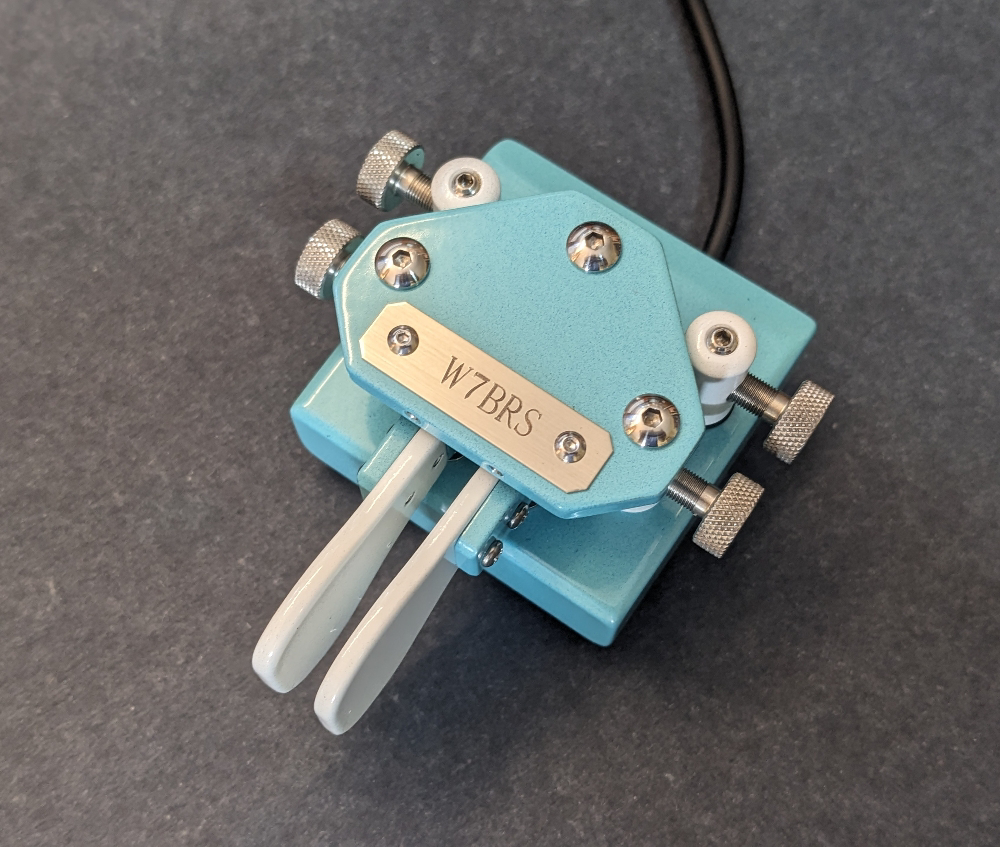
New Key

I was holding off buying a new key.

After Salmon Run I decided that it's time to get a fine key so I'm ordering a N3ZN iambic paddle.

Working out the details now.  


Sunday, September 17, 2023

Finished Salmon Run 2023

I'm in line at the Kingston Ferry, the route reduced to one boat, instead of the usual two. I'm leaving the west side where I spent the weekend operating with Rusty, W6OAT during Salmon Run 2023.  I thought I'd drop a quick note before the Ferry starts to load.

Far and away the best experience contesting this year.

It had been on my calendar since 7-QP and with all of the MST contesting as well as other state QP's the copy-practice paid off.

I cannot comment directly on the score -- I don't know precise numbers.  But we did as good as we hoped we would.   Some highlights:

  • We got to work K7TQ (Randy and Mike N7WA) on each of the counties they travelled -- many times on multiple bands.  Fantastic!
  • A lot of the WWDXC members were in the log too.  N7SS -- we worked Dan I believe on all the bands 160-6.  "7-Band-Dan"  And for a lot of other members, we worked them on several bands during the contest. K5EM, WA6CPA, and a whole long list.
  • The DX was great. 9N7AA was a good contact, and I believe we made contacts across all the continents except for Antarctica.
  • The SAC provided a lot of good DX.
  • Rusty and I chuckled at the spot-networks -- the Canadian provinces we really needed were skimming our signal routinely.  But no VE6's or MT's to be found!  Still we did reach into a VE2 late in the contest and that was great.
  • About mid-way through the contest we re-mapped some of the Macro-keys to ask "QSY up?" essentially trying to get some contacts on 6m and 160m.   It was fun when we'd get a bit of tracking on that.
  • Our friend NN7SS also gave us some Q's -- and that was fun since the last time I heard NN7SS was when I was operating it for RSGB IOTA in July.  Mark, K6UFO -- thanks for the QSOs!

It was a lot of fun and I appreciate all the hard work that went to prepare the contest.  I'm especially thankful to Randy and Mike for taking a ride through eastern Washington for two days+ to give us those Q's.   Thanks guys!

My thanks to Rusty and all the help and guidance.  We had a great time.

There's probably more that I could say and I'll leave room for that when the score gets posted.   Thanks again for the QSO's and QRS to my speed.  

Another big contest is just around the corner:  The California QSO Party.    https://www.cqp.org/Rules.html


Until next time..  73 and GD DX. 


SR goals

We had a few goals to strive for:

All the counties (39)
Work all States
Work all of the Canadian Provinces
1000 Q

We reached one of them. 😊

About hour or less to go.  Rusty is mopping things up on the bands.  We're in good shape.

I'm very much looking forward to posting the scores.  


Making Qs

The rate is getting sparse now on the second wave of the Salmon Run.

We'll have to keep picking out stations.

Hoping to get the Canadian east provinces and 5's and 6's.

Near the end of Day 1 - Salmon Run

The Run for day 1 is almost over and we're doing great.

Far exceeded our 7-QP numbers for the first day of Salmon Run.    Highlights were to use 160 meter antenna and also the 6 meter beam for the Salmon Run.   

We managed to log way more DX than we needed -- we had the maximum countable DX within the first few hours.

The state count is still missing a couple and we're shy a handful of counties.

But we expect to round out those numbers tomorrow morning.   As long as the CME that was expected to brush by doesn't make it too much trouble.

On the plus side, I got to work the station for most of the time and even ran the speed about 23 wpm for most of that time.  And several calls I could copy without the check from Rusty, but I still relied on his ear.  It was a team effort!

Practice is what this is.

A fun day!


Saturday, September 16, 2023

Salmon Run 2023

Rusty W6OAT and I are well into the Salmon Run today.

About six hours left in the first session before the break.

We're working all the stations that will give us multipliers and add to the score.

The bands have been relatively good, except 20 meters a bit noisier.  All together, a great Salmon Run so far, but we have many hours to go.

The adventure started on Friday afternoon when I took the ferry from my home QTH across the sound to Kingston and then travelled to Rusty's QTH.

We spent the evening going over our plan for SR and talking about the stations we want to work, and the rovers we knew of that would be in the Eastern Washington counties that are more difficult to hear.

After the setup was done, we worked on the N1MM macros and then setup the audio chain so we can both hear the signals at the same time when one of us is working the key.

I brought some hardware to allow us to use my key (Bencher BY-1) and Rusty could use his Vibroplex without any cable changes.   

In the evening Friday we played on the radio -- and I worked a handful of DX with his station using my call.  The feature I love about his station is the KPA and the 4 element SteppIR that lets us put the gain where we want.  Really nice setup!

The goal we established was to simply have fun.  We're up against some good competition for Salmon Run so it is going to be challenge to work numbers to get to the top of the list.  But that's not as important as having fun.

Although it's a bit fast, I set the key to work 23 wpm -- I can just about copy most call signs there, but Rusty is there to help always make sure we copied it right.  When Rusty's working the key, we run a bit faster, around 27-29 wpm and that really moves us along.

Well, back to the contest.  Just thought I'd give an update.

Thanks for all the QSO and QRS.   We have more multipliers to go!   Looking for those East coast Canadians and a few K States that would help us round out the list.


Friday, September 15, 2023

Mea Culpa

On the CW-Ops Groups page I made a mea-culpa saying that in effect I had been using decoders for some of my contesting -- when the speeds were 28+ , and that I had to come clean.   I had already turned off the decoder, but the catharsis in the apology was important to me.


Anyway, then I get an email from CW-Ops editor to use the parable in the next Solid Copy issue.  And they did.   


Page 8.

Thanks.

Monday, September 11, 2023

All good things

I thought that my procrastinating in 2011 would make my QSL from ZD7 go unanswerable.  Mail to ZD7 is tricky.

17m, SSB

What a surprise in the mail today.

12 years...

Monday, September 4, 2023

Worked the Guy

Well, that's just perfect.

I need more practice on CW rag-chew.  The CWOps Intermediate Class I'm taking started last week.  We're going through the intermediate level -- where I need the most help -- just copying story's and long-form QSO type conversations.

I'm not a huge 'rag-chew' sort, but if I can carry a conversation in CW that's an improvement.  

I set my coffee to the side, tuned to the range where the CW Ops Academy people hang out and started calling CQ.  Had a couple calls and then got a strong signal from 6-area.

I get a call from N6KR and I knew the call sounded familiar -- At first I thought it was one of the CWOps regulars (and it may be, I need to check the logs).  But just as I'm writing out a QSL card I realize who it is.

Not often you get to work another operator who made some excellent equipment -- and using his radio design too.

That was a lot of fun and I hope to work him again and maybe Eric too, hihi.

At any rate, that was just what this was supposed to be.. a lot of fun and surprising.

Thanks.


Sunday, September 3, 2023

Working Tennessee

I was really excited about working TN QP.

Great state and great operators.

Except, not much on the bands.   Only 30 mults so far and 4 hours to go.

VK2/W7BRS QSL .. Now where?

 VK2/W7BRS QSL The QSL Cards have arrived from the printer. You can get a QSL card two ways: By the QSL Manager,  M0URX    (Highly Recommend...